Planning
Takes requirements apart, asks questions, builds decisions and checks that the documents agree. Quality of reasoning matters most here.
A local development environment for engineers, teams and studios. It turns an idea into requirements, specifications, a plan, small tasks, code and a result you can check.
The AI does the work; the team keeps control of the decisions and sees what backs every finished step.
See the problem SF solves and the principles the work is built on.
A model writes fast, but a conversation holds no project structure, no dependencies and no history of decisions. specaflow turns the talking into sequential work: every result stays in files, is checked on its own and becomes the ground for the next step.
A new project does not start from an empty chat. The intake survey walks through the product, the infrastructure, the backend, the design and the frontend — it draws out the decisions people usually remember halfway through the implementation, and hands them to drafts as structured context.
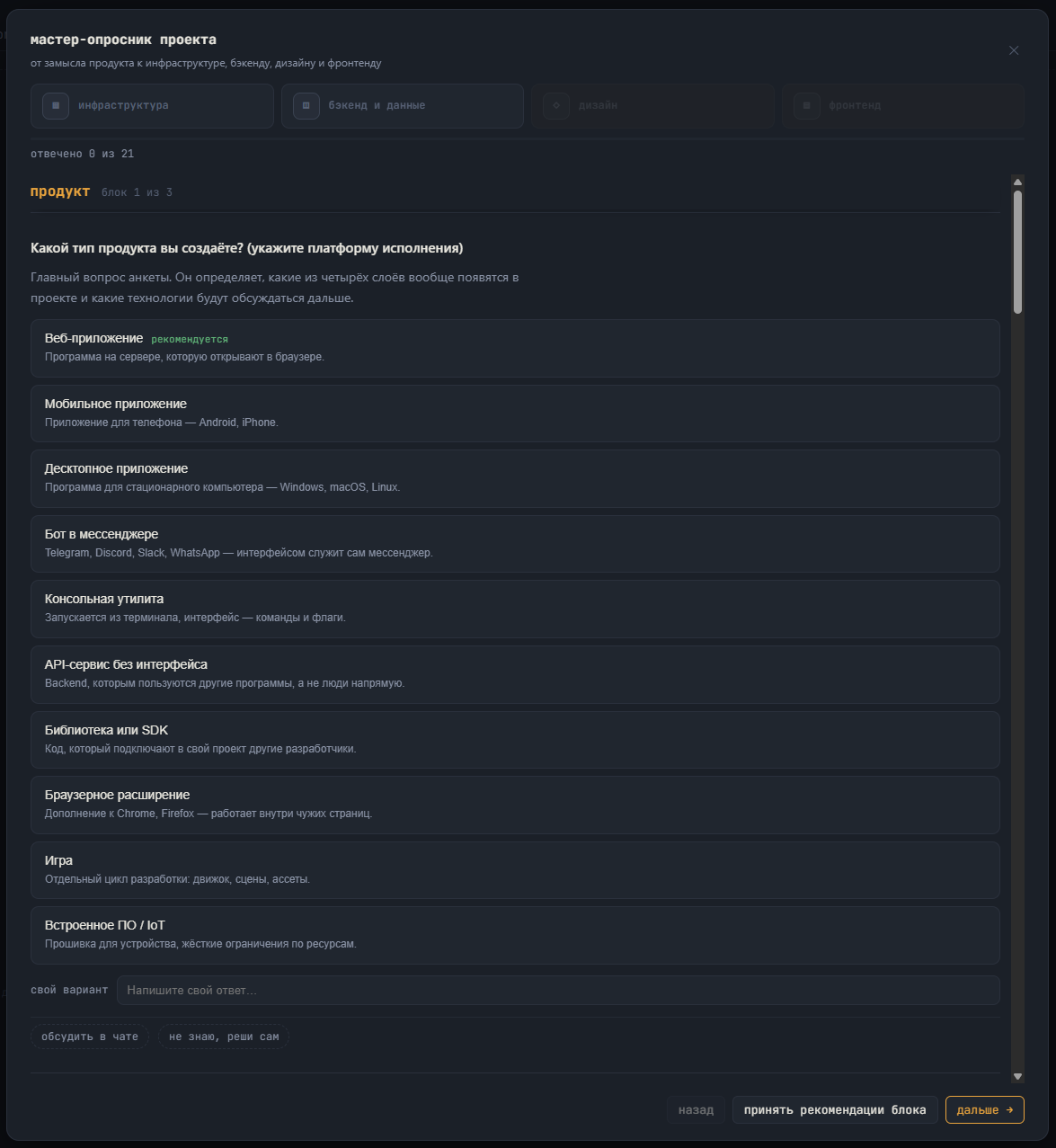
The questions depend on the kind of product. The answers, the assumptions and the deferred decisions are saved and become the starting context for everything that follows.
A “Habit Tracker” app — from the idea to committed code. Frames advance on their own; use the dots to step manually.
An idea is easier to draw than to describe. A shared canvas opens beside the draft chat — and it is drawn on by both sides. You sketch a diagram or paste an annotated screenshot; when you send a message the AI receives both the structure of the board and a picture of it (vision). And it answers in kind: “sketched the architecture on the board — take a look”.
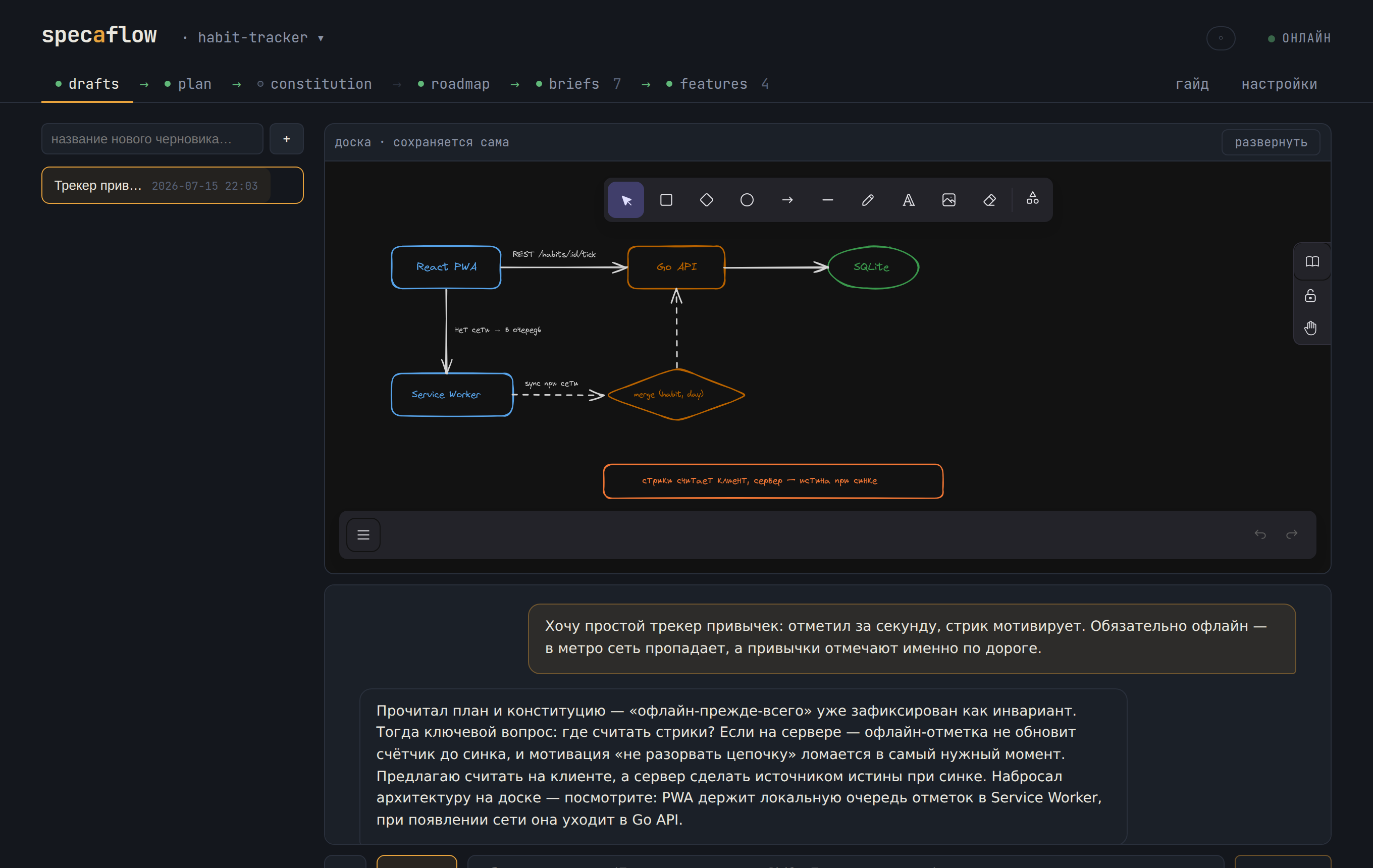
The model does not move pixels — it sends operations: add_node, connect, insert_between, group… The server works out the coordinates; the model refers to elements by their label. After each batch it gets a fresh projection of the board and the lint findings: the model checks for itself that it drew what it meant to.
The courtesy is built into the tool: the AI moves its own nodes freely, and touches what you drew only after explicit permission, asked through a clarifying question. A shared board does not turn into “the AI redid everything”.
The scene is an ordinary excalidraw file beside the draft, saved automatically. So is the whole draft chat: the “## You / ## specaflow” transcript is markdown and lives in git with the project.
The AI does the work, you take the decisions. No result becomes part of the project without your review.
A phase has produced its result and the work stops. You look at the changes file by file: accept them into Git, or send them back for another pass with your reasons.
No database: the status of every feature is recomputed from specs/ on every request. Edit the specs with any editor or agent — the dashboard follows the files.
The server runs locally, and with a local model it is fully offline. Suitable for closed environments: not a line goes out unless you connect a cloud API yourself.
Every feature grows in its own branch. Only what you accepted reaches the Git history: no hidden commits, and everything the model did is visible and reversible.
The main disease of AI coding is silent drift: the plan says one thing, the code does another, and within a week the documents are lying. In specaflow a departure from the plan is a protocol, not an accident. No deviation appears without your approval, and no approved one is ever lost.
Real screenshots from a project that went through specaflow end to end: the infrastructure, the backend and the design layer are delivered, the frontend is next in line. The numbers on the screens were computed by the tool itself. In the header is the project manager: switch between projects and connect new ones without leaving specaflow.
The project manager — this is where the work begins
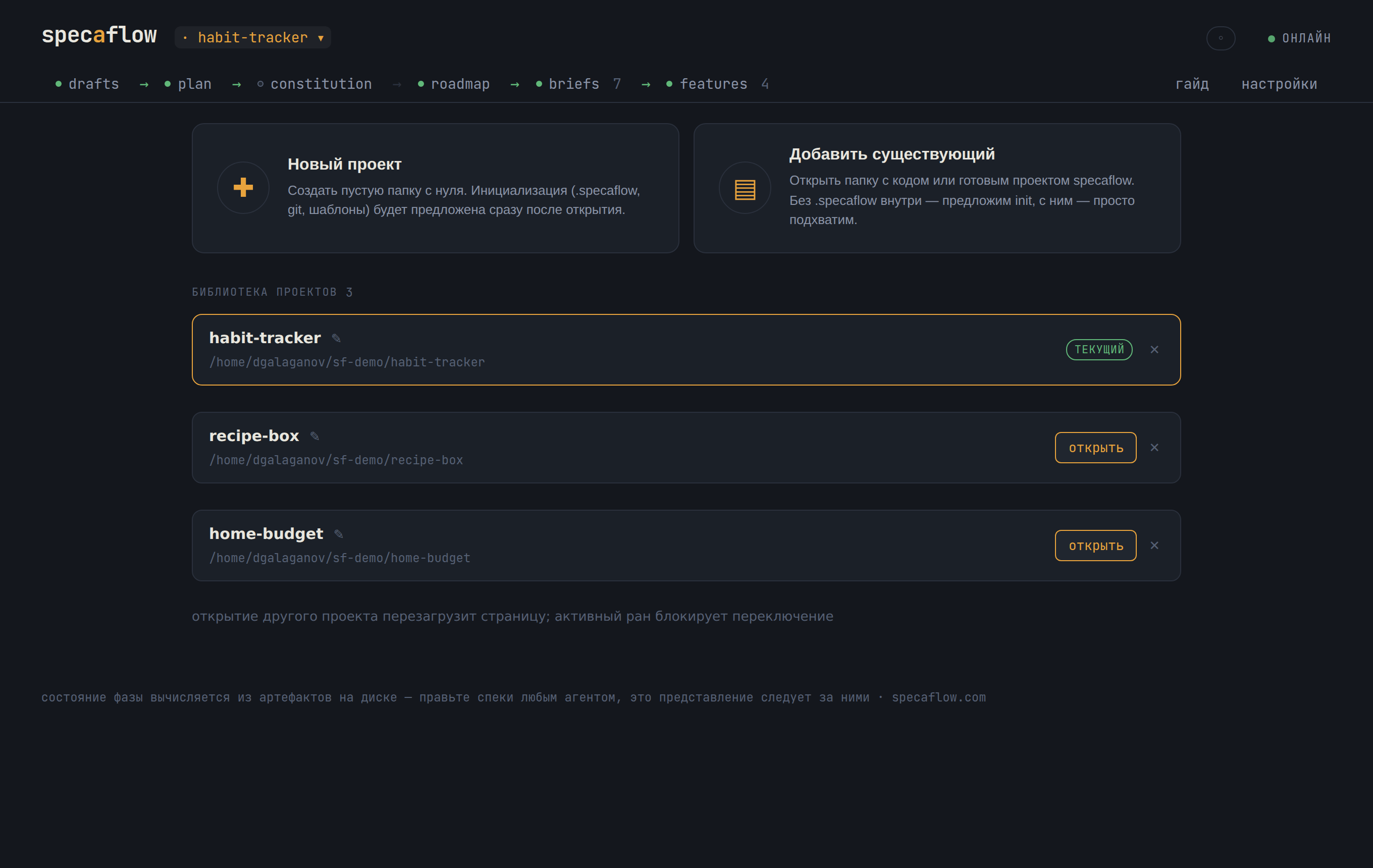
One running specaflow drives all your projects: switch from the header, connect an existing folder without overwriting anything, or create a new project.
Features — features by layer, with the status derived from the files
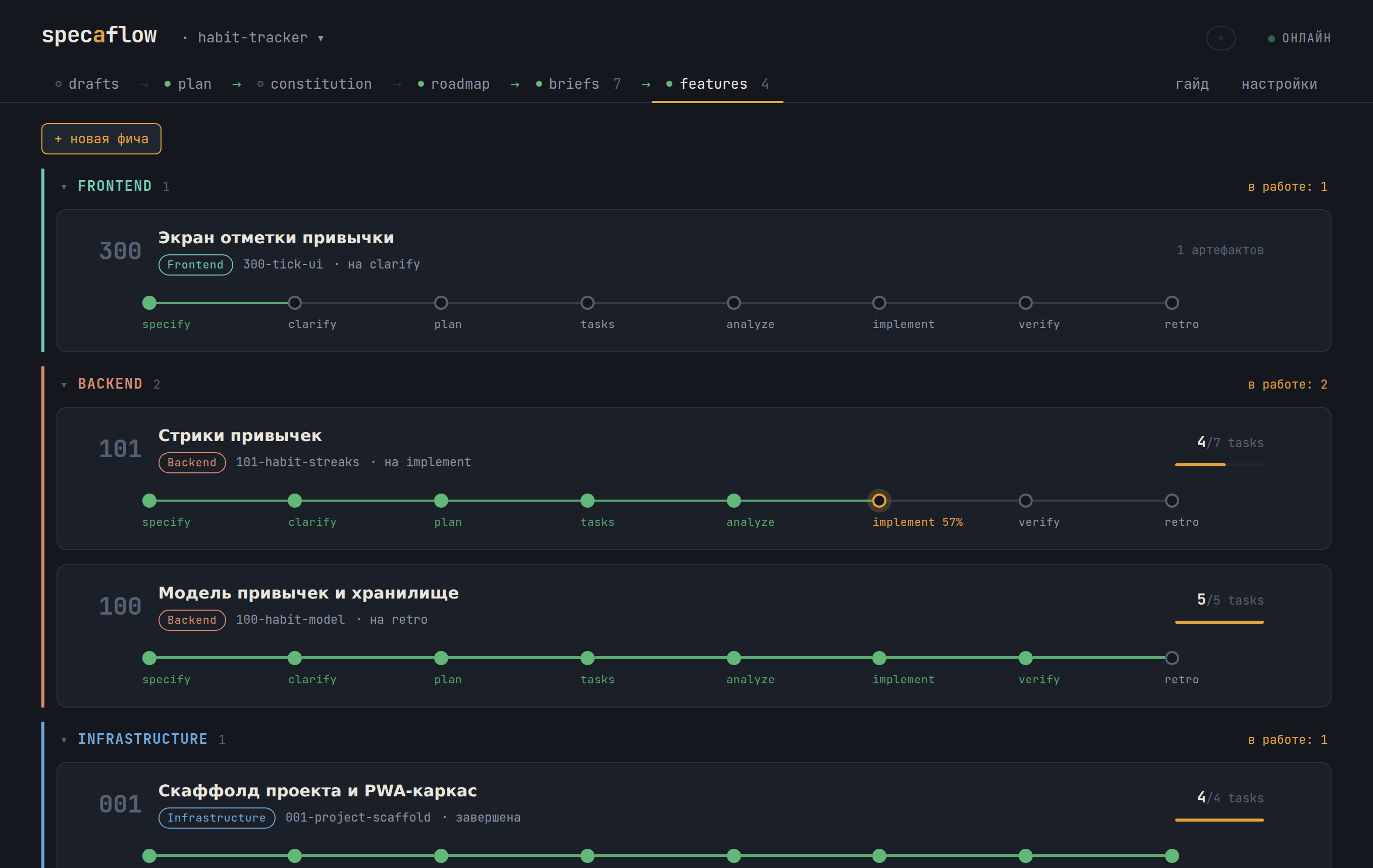
Each card is a feature with its strip of phases: green is done, amber is in progress. Layers collapse; the current one is always on top.
The feature card — its whole path and what each phase settled
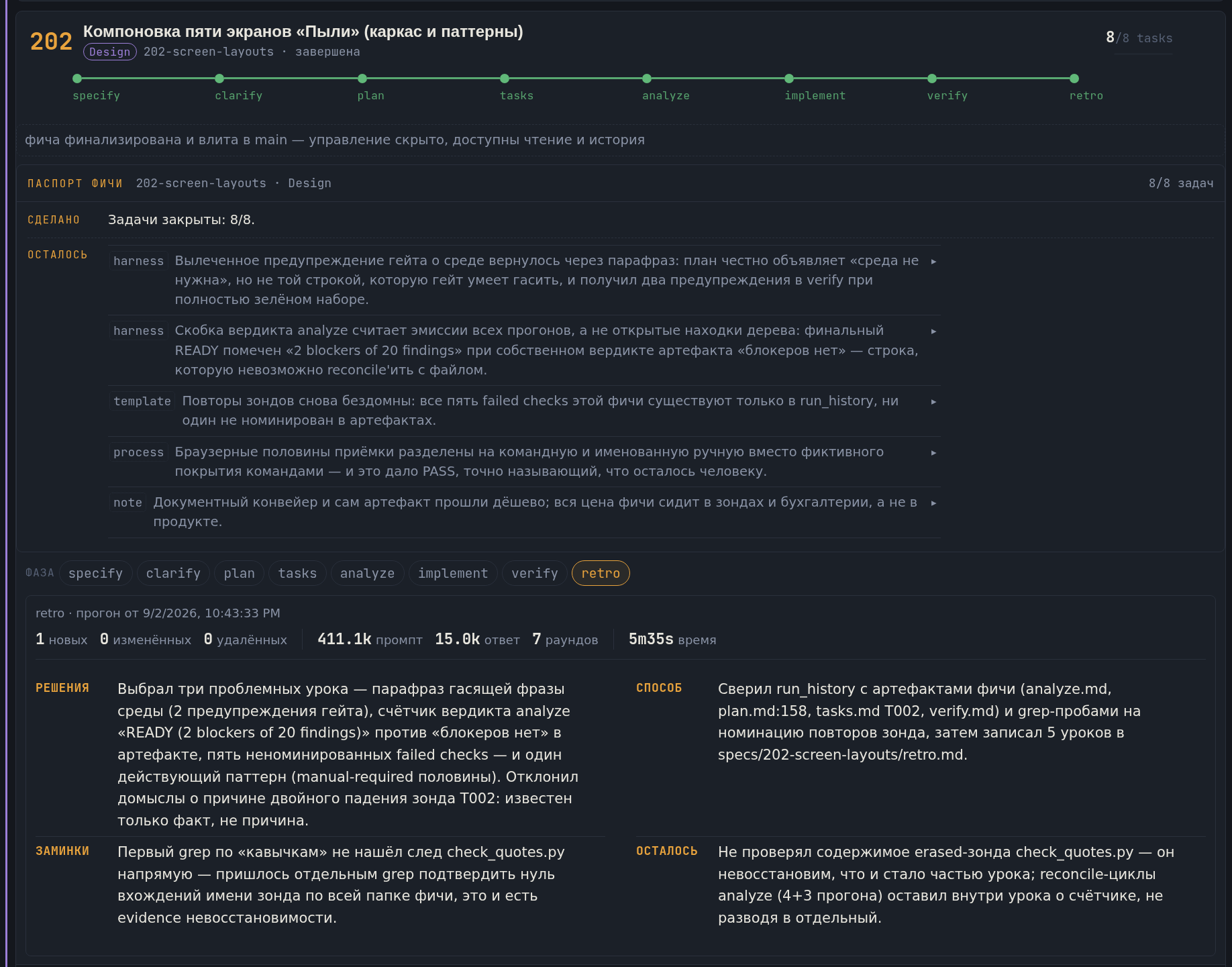
An expanded card holds the whole cycle. At the top, the feature’s passport: what was done and what lessons it left the project. Below it, the passport of the selected phase: what it settled, by what means, what it stumbled over and what it left for the next one, with the price of the run in tokens and minutes beside it. A passport outlives its run — transcripts are evicted, the record stays.
What each layer guarantees — and what proves it
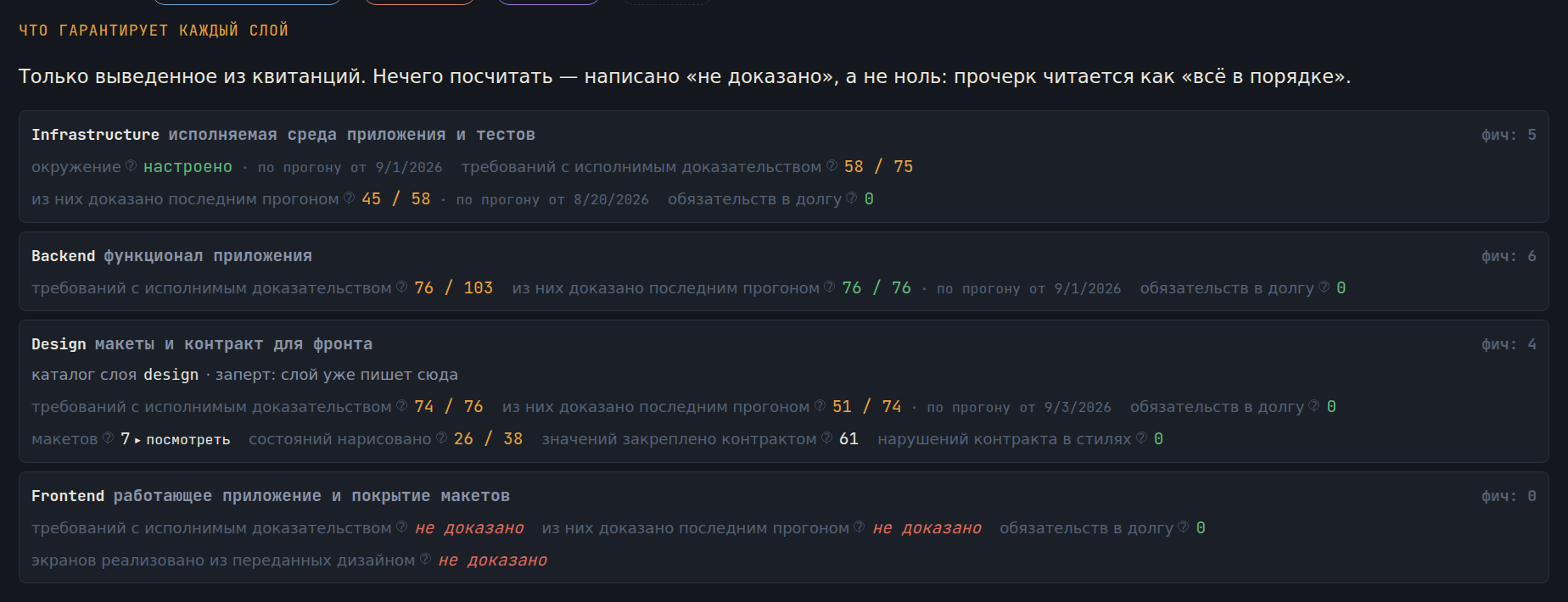
Every layer reports numbers the tool derived from receipts, not from promises. Nothing to count is written “not proven”, never zero. The design layer has metrics of its own: how many mockups, how many states are drawn at the addresses the specification fixed, how many values are held by the token contract.
The design layer starts with a choice, not with a description
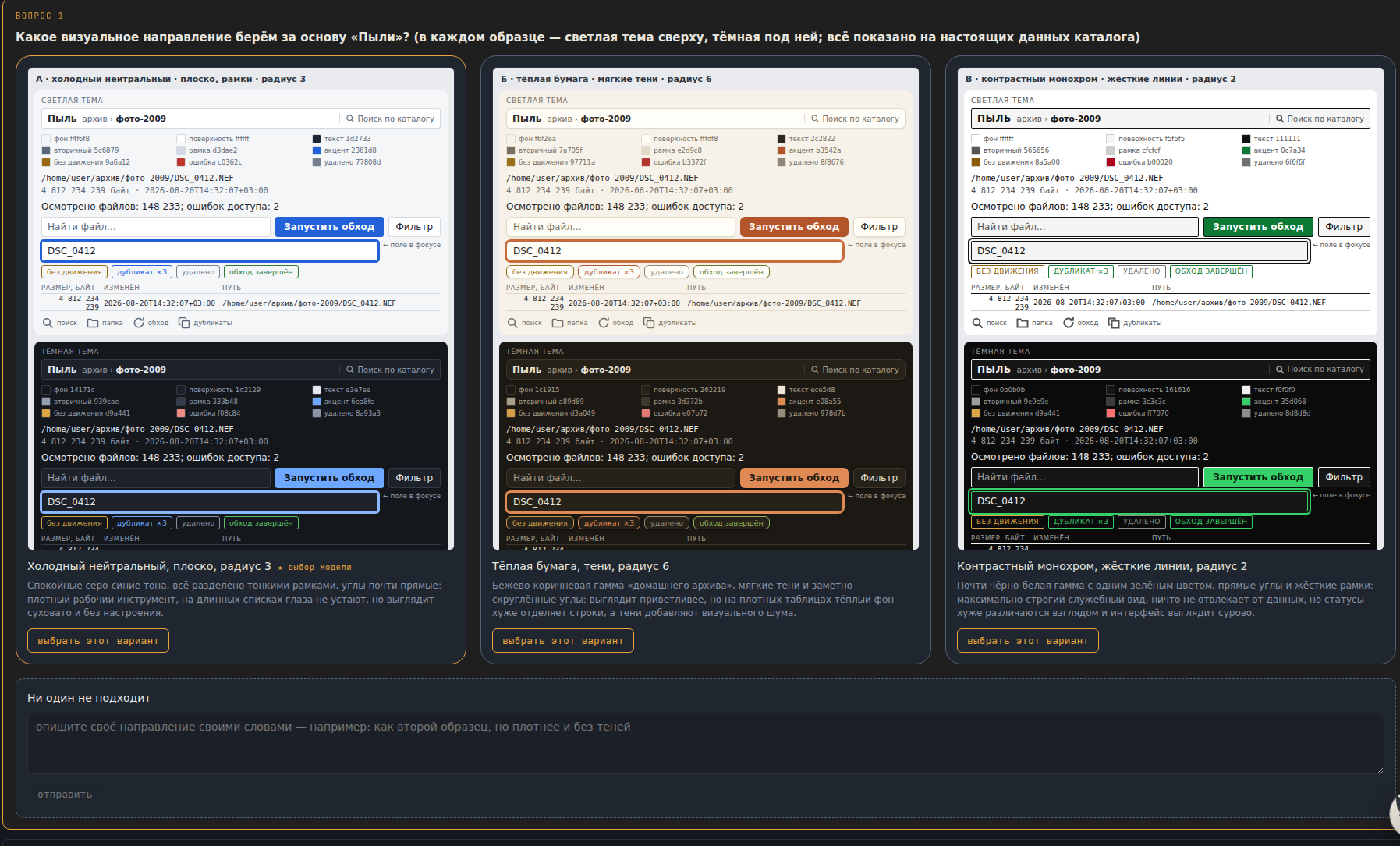
Almost nobody can describe a look in words — everybody recognises one. So the tool builds two or three finished samples on the project’s real data and asks you to point at yours; under each one it says what that choice will cost in the work. A free-text answer is taken as an amendment: “the second one, but darker and without shadows”. The chosen sample stays as the reference, and its values are the seed of the token contract the whole visual system grows from.
The built-in assistant answers quick questions, explains how specaflow is put together and helps you work out what is happening to the project right now. The “+” button attaches the current tab, the open feature, the state of a run or the log of recent runs to your question.
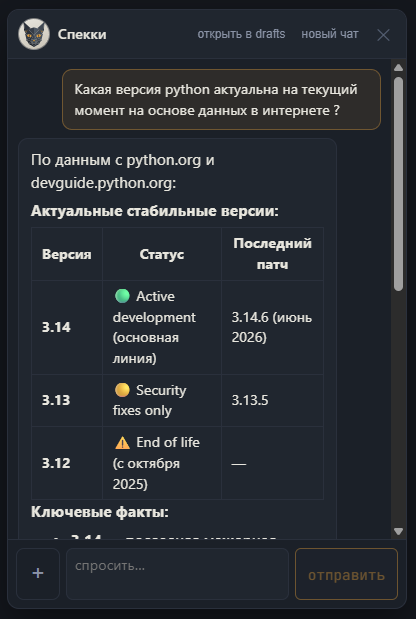
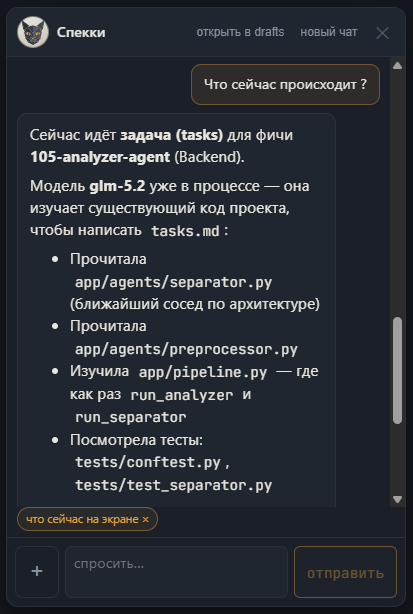
You switch on the “what is on the screen now” chip and Specky receives a snapshot of the working state. In the example it sees that 105-analyzer-agent is in the phase tasks, knows which model was chosen, and explains which files the agent has already read.
A quick question can be opened in drafts and grown into a full discussion. And the other way round: a conversation from drafts continues in the compact assistant — neither the history nor the context is lost on the way.
With nothing attached, Specky answers as an ordinary adviser. One press shows it the current screen, the active feature, a phase’s question, the run log or a file — no hidden giant prompt.
The assistant is read-only: it starts no phases, creates no documents and changes no files behind your back. It can be given a model of its own or use the main profile.
Inside specaflow is an agent harness written from scratch in Go (the standard library only, not one third-party package). It leads the model through the phases with a fixed set of a dozen tools and takes on everything that makes “just plug in an LLM” fail in production.
No “give the model everything and hope”: the set is small, known in advance, and the rights depend on the phase.
Every mechanism here came out of a real failure — and after it, that class of failure stopped killing runs.
Plus a journal of every run on disk, limits on rounds and web requests, and a watch on how full the context window is with a warning to the agent — the boring plumbing without which agents do not survive to the end of a phase.
An ordinary agent starts a phase blind and spends dozens of rounds leafing through files, filling the context with whatever it managed to find. specaflow has a hybrid search across the whole corpus of the project built in — specifications, plans, briefs, the constitution, the documentation: BM25 + vectors + Reciprocal Rank Fusion, written from scratch on the Go standard library. No vector database and no external services: the index is a cache in .specaflow/index/, derived entirely from the files, with changes picked up by an sha256 comparison — including after a git branch switch.
Before a phase starts, the harness pulls the relevant slice of the corpus itself and puts it in the opening prompt (a budget of about 3000 tokens). Fewer “let me read one more file” rounds, fewer tokens spent re-reading the same thing — and analyze sees cross-feature links that are not in its own feature’s artifacts.
The tool search_project understands both “how our token rotation works” and an exact identifier like T029: the vectors look for the meaning, BM25 for the letter, and RRF merges both result sets. Every snippet is labelled with its path, heading and lines — the model must re-read the source before leaning on it.
Embeddings come from any OpenAI-compatible endpoint, including a local Ollama / LM Studio / llama.cpp: the project never leaves the machine. If the embedder is unavailable, the index works lexically and finishes vectorising when it returns. With the toggle off, specaflow works exactly as before: RAG cannot break a single phase.
The later a defect is found, the more it costs to fix. specaflow shifts the search for defects left — into the specification and the plan, where a correction costs minutes — and cuts the review into portions somebody can actually read.
relative to a correction at the specification stage*
* the classic industry estimate (Boehm; IBM Systems Sciences Institute)
lines in one sitting, a typical feature
specaflow splits the same feature into small portions of change you can review attentively
SF does not split mandatory connections — it splits three clear roles. You can give the same model every role, or pick a combination by quality, speed and cost.
Takes requirements apart, asks questions, builds decisions and checks that the documents agree. Quality of reasoning matters most here.
Carries the decisions taken into documents, checks and code. Precision, speed and the ability to follow a settled plan are what help here.
Explains the current state of the project and the next actions it allows. Read-only: it changes nothing behind your back.
Every role receives the same confirmed context from the project’s files. That is why changing the model does not wipe the history of decisions.
specaflow is a single Go executable with no external dependencies: no Docker, no Node, no Python. Download it, run it, and a window opens with the project manager built in. Connect an existing folder without overwriting anything, or create a new project right there.
Local inference or a cloud API, your choice. The built-in connection test checks that the provider really supports tool calls.
Every phase run leaves a trace in a journal that is never trimmed: the model, the tokens, the rounds, the retries, the machine time and how long the run waited for your answers. The “stats” tab builds a live dashboard out of it — tiles, bars by phase, a token doughnut by model, feature cycle times — in plain SVG, without a single external library, with a period filter and real-time updates at every gate.
Waiting for the developer — answers to clarifications, the pause before a decision at a gate — is counted separately and subtracted. You see the honest speed: how long the model worked and how long the task sat with you. A night before a morning approval does not spoil the metric.
Every run is attributed to a model. The table gathers the criteria together: average rounds, retries, the share of rejects at gates, tokens, time per phase — you see which model gets the work to approval more cheaply and reliably, and which one drives its tools in circles.
Projects that started earlier lose nothing: every approval has always been a commit specaflow: <phase> <feature> — the phase times, the finalizations and the age of the project are restored from the history. No database: an append-only journal plus git.
The period filter recomputes everything instantly — the data is already on the client. Close a gate and the numbers update themselves over SSE.